
The amount of times I have seen people have issues setting up SillyTavern is insane. I wrote a guide once, but it got lost to time, and so this time, I’m posting it on my own website. In the event this guide goes down, well, I’ve either lost power, internet, or I haven’t paid my domain bill. I’ll probably copy it somewhere else at some point anyway, although if it ends up elsewhere, it will likely lack my usual flavour of written word. Cry about it.
This will be the first of probably three guides. The first will be getting SillyTavern set up and running locally on a Windows PC. The second will probably be going over the common settings, what they do, things like that. The third will probably be doing a deeper dive into things like Tailscale and/or Cloudflare and/or reverse proxies to allow access to the SillyTavern instance from anywhere.
At the bottom of each guide, I’ll probably put a tl;dr section which is just dot points for anyone who doesn’t like reading. If you can’t read, on the other hand, you’re going to have a bad time here.
Let’s begin.
Note: If you have an IQ that’s above body temperature, you can probably just follow the setup steps provided by SillyTavern HERE.
This AI gooner is a bit up himself, isn't he? A three-part tutorial, he reckons?
Before we begin, I’ll explain my current setup, partly so you can understand where I’m coming from, and partly because I’m a massive fucking nerd and I like mucking about with all of this and also talking about. If this is a problem, please see the first three words of this article’s first paragraph.
My personal SillyTavern instance is running on a virtual machine on my home server. Yes, it’s running on a Windows VM, not it’s not running in a container, Br I cannot express to you how much I do not care about how much faster, or cooler, or easier Docker is. Write your own setup tutorial for Docker. While I do have a Tailscale mesh VPN set up, rather than use that, I have a reverse proxy set up on a different VM with the required ports, and I have an A record in Cloudflare set up so I can access it via a hostname (which is based) and not an IP address (which is cringe).
tl;dr I overengineered a solution because I’m an idiot.
But it does mean I can open up a browser on any device, anywhere in the world, with or without Tailscale, log into my SillyTavern instance, and all of my chats, bots and settings will be identical. That’s based, by the way, for those keeping score at home.
And now, because there hasn't been anything moving in five minutes

Step 1: Git? More like, uh, what is all this nerd shit?
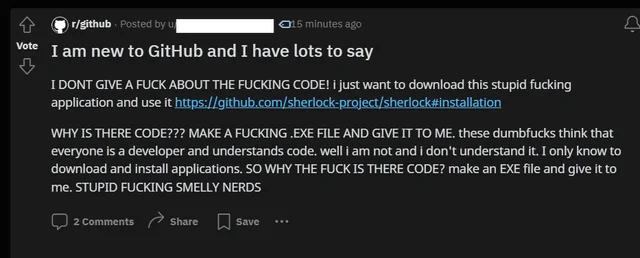
Unfortunately for those of you with room-temperature IQ (see left), SillyTavern is not a simple file that you download, double-click, and run. There’s a little bit more to it than that.
To begin, you’ll need to install both NodeJS and Git to your PC. What do these do exactly? Who fuckin’ knows, Google it. NodeJS is something something JavaScript code nerd bullshit that I neither know about, nor care to learn about. Git is basically version control, and code nerds use it so a bunch of them can work on the same codebase at the same time, and push changes, without code collisions. If I got those explanations wrong, I literally do not care.
Part 1: NodeJS
Really fuckin’ easy. Go HERE and click the ‘Windows Installer (MSI)’ button below the big scary code block. I’m not even going to give you a screenshot for this, because if you genuinely cannot use your eyes to find a button to download a program, I cannot help you, and indeed, nobody can. I wish you luck with life after your recent lobotomy. Latest version is fine. As mentioned by the ST developers, ST cannot be set up Windows 7 or older.
After it’s downloaded, install it. Click next a bunch of times, and when you get to the page with the checkbox about Tools for Native Modules, tick the box and continue. I don’t even know if this is mandatory, but I’ve never not clicked it. Keep clicking next until it starts installing, then you wait.
After the installation is done, a command prompt will appear talking about the Native Modules thing. Read it, or don’t, I don’t care, just press space twice and wait for the Powershell shit to finish. It’ll take a while. Just be patient. Scroll back up and watch that Subway Surfers gif if you think it’ll help. When it’s done, it’ll say Press ENTER to exit.
Part 2: Git
Once again, no screenshots, because it’s downloading a program and clicking ‘Next’ a lot. Link is HERE.
Defaults for everything is fine. Only thing I’d suggest, if you care, which you don’t, is to change the text editor from Vim to Nano (shut the fuck up, Br, I literally do not care). Then just keep mashing ‘Next’ until the installation is complete. Dead simple.
Step 2: Oh God Command Lines Scare Me
After you’ve installed those two programs, create a new folder somewhere that isn’t a protected folder (i.e. don’t fucking try to install SillyTavern into System32, you fucking wanker). For the purposes of this demonstration, I will be using C:\Software. Go into that folder, and at the address bar at the top of the File Explorer window, type cmd and hit Enter to open a command prompt window.
Once the window has opened, and you’re looking at spooky white text on a black background, I need you to do your best Matrix hacker impersonation, and copy and paste the following text into that window:
git clone https://github.com/SillyTavern/SillyTavern -b release
No, I will not be providing the link to the Staging branch. If you know the difference between Release and Staging, you don’t need this guide anyway.
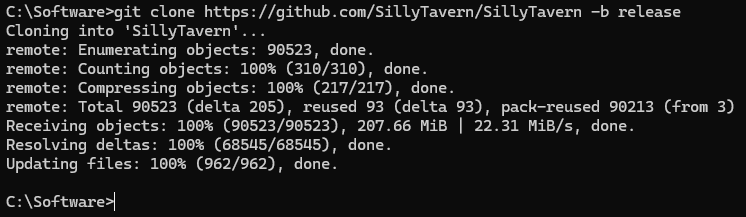
Now that the repository has been cloned into the local folder, go into the folder that was just created (for me, that would be C:\Software\SillyTavern) and double-click on start.bat to install the required dependencies. What does that mean? It means click the fucking .bat file. If you click the .sh file by accident, that’s a you problem and you need to learn how to read better.
Once everything is installed, the command prompt will say to go to http://127.0.0.1:8000 to open SillyTavern. However, by default, your browser will open automatically and load SillyTavern for you. Wow. Incredible. So easy, so fast, how do so many people have so many issues with this!?
There are, of course, some things to keep in mind:
- Closing the command prompt window will kill SillyTavern. That window must always be running.
- This means you cannot shut down your computer if you try to access your ST instance elsewhere (i.e. on a phone or another computer).
- There are Update and Update & Start .bat files in the folder you created. If you need me to explain what they do, please hit your head against a wall until the question goes away.
- This instance, currently, can only be accessed on your local machine. I think you need to forward ports on your router for it to be accessible on other machines on your local network, but I haven’t tested it, so I don’t know. Give it a shot!
In Conclusion
This shit easy, even for an idiot like me, so I don’t know what everyone else was complaining about, honestly. The instructions on the ST Github page are perfectly readable.
If you already know where to get bots from, and don’t mind mucking about with the settings yourself, then you’re good to go. Have fun!
I will do up a second guide probably around [insert future date here] to cover settings and things like that. Or maybe I won’t! I don’t owe you anything!

Leaobetvip is my new jam! It’s super intuitive and had exactly what I was looking for. Quick and simple, nothing more you can ask for. Take a look: leaobetvip
Alright, so I gave lucky777lucky100lucky a shot, and I gotta say, it delivered. Very easy to use, and works for what I needed. You should totally check them out, link below. Access it here: lucky777lucky100lucky
Hey, 337jili! Checked it out the other day, pretty solid. Got some nice bonuses and the games run smooth. Definitely worth a spin. Check it out here 337jili
每天都在战争,希望2026和平.
Hello88circle is worth a look. Good selection of games and decent graphics. I like how easy it is to deposit and withdraw. Might be worth your time playing hello88circle.
Looking to place some bets? Gamdom Bet offers a solid platform. Good selection of games and betting options. My advice? Go check out gamdom bet before you bet anywhere else.
Went to this link frivv for some Frivv games. Lots of Flash games, some good some bad, something to fill the time though. No download, right in the browser.
Great guide! SillyTavern’s flexibility reminds me of how platforms like jili365 apk succeed by prioritizing user-friendly interfaces. Local AI setups empower experimentation without API costs—smart approach for enthusiasts wanting full control over their experience.
Excellent walkthrough! Local AI deployment shares similarities with gaming platform setups—proper configuration is everything. Your troubleshooting approach mirrors how verified okpun legit operations prioritize user experience through reliable infrastructure. Looking forward to the remote access guide!
Yo, check out 777sxgame. Their interface is smooth, and the games load quick. Been having some good runs lately. Give 777sxgame a look, you might get lucky!
Bono777 is where it’s at My buddy told me about it and I’m hooked Give it a shot bono777
Yo, Gamex8 is legit I’ve actually won some decent cash there The games are cool too Check it out y’all gamex8
看不懂但大受震撼
Very good i like it
Great setup guide! Clear installation instructions are crucial for user experience. Just as the phwin777 app download process needs to be seamless, your walkthrough makes SillyTavern accessible. Looking forward to the Tailscale guide!
EA77lucky is my go-to spot when I’m feeling lucky! Always a good experience and never a dull moment. Highly recommend checking it out! Learn more at: ea77lucky
Oinkcasino, what can I say? If you want a casino with a bit of charm and solid games, this is it. Give it a spin and see what you think: oinkcasino
Golo777game has kept me entertained for hours. The games are great and the site is easy to use. What more could you want? Take a look here: golo777game
Niceph25, eh? Not bad, not bad at all. Pretty smooth experience, easy to navigate. I like the variety of slots they got. Give it a whirl and see what you think niceph25.
Allyonogames, huh? I’m checking it out now. I like the design. Seem to have some good deals. I will def play a few rounds today. Check ’em out yourself allyonogames.
Checking out 8ku? I am sure you could spend ample time here. Seems like a nice and active community. Check it out here 8ku.
wish you all the best
Mass comment blasting: $10 for 100k comments. All from unique blog domains, zero duplicates. I will provide a full report and guarantee Ahrefs picks them up. Email mailto:he**********@***il.com" data-original-string="KXc6+h4bMHYVwLvnlOqf8Q==4d1ZoCO9npufAKcf7TZiiC0UK31ZRNf+FxxcJAK46ZeazWBzr2gd91u9afun7gWRFJL+1IsDLxeIccO/7rCj1E2g9v5rvfN0DiRRwXv+4eMTIGDrlh7y57jvSki/ZrmRQC9" title="This contact has been encoded by Anti-Spam by CleanTalk. Click to decode. To finish the decoding make sure that JavaScript is enabled in your browser. for payment info.If you received this, you know Ive got the skills.
香港服务器,4G8核18M宽带80G硬盘,只要一元钱!网址:host.993899.com
Great guide on local SillyTavern setup! Reminds me how crucial seamless onboarding is—users expect instant access whether they’re configuring AI interfaces or jumping into premium gaming. Platform reliability really makes or breaks the experience, much like what we prioritize at kkkl login casino for our players.
wish you best and best
色即是空,空即是色
https://shorturl.fm/n5DwC
So dive in, have fun
This deep dive into decentralized access (Tailscale/proxies) perfectly illustrates the challenges of scaling local tech into global services. Mastering these networking layers is key. It reminds me of building robust platforms, whether it’s for AI interaction or accessing services like hyph777 app download apk. Excellent resource!
无话可说,只是看看
Good a blog toper
Im 4466,yahoo
Just started playing here a week ago and I am already hooked. The variety of games is impressive and the registration process was a breeze. Give mybcb88 a try.
Was having some trouble finding the right app version but this site made the process super simple. The download was fast and the login is secure. Great job by the team at p999comlogindownload.
Really impressed with the variety of betting options available here. Everything is intuitive and the loading times are minimal even on mobile. I am sticking with vn22bet1 for my weekend bets.
Honestly, the focus on local payments is key. Reading this, I realize understanding RTP and volatility is huge-it’s not just about the bonus! Check out 8999 bet bonus app for more insights.
Finding a working link that actually loads fast can be such a hassle these days. I tried this one out and the interface is so clean on my phone. The game selection keeps getting refreshed and I love how transparent the bonus terms are. Definitely worth bookmarking if you enjoy spinning slots or trying live tables. 1928betlink
I switched from another platform and the difference is night and day. Registration takes less than a minute and the game library keeps getting better. Withdrawals hit my account within the promised timeframe without any headaches. pe8okplay
Been chasing Jackpots here for months and the withdrawals are always on time. The support team actually knows what they are talking about. Definitely my go to spot for weekend fun. pk3jbet
The architectural challenge of remote access (Tailscale/proxies) is a perfect analogy for scaling any complex service. Mastering the infrastructure to ensure seamless, always-on availability is key, whether it’s a local AI instance or a high-traffic platform like 777pnl slot.
Here you are
As a regular player I appreciate how transparent everything runs here. The welcome bonus matched exactly what was advertised and the terms were actually reasonable. Navigating through the games is intuitive even for newcomers. I always feel welcome when I log in and the team genuinely cares about player satisfaction. mexganacasino
I have tried so many gaming platforms over the years and this one really stands out for its genuine transparency. Every bonus comes with clear terms and the games load without any lag on my phone. It feels like the developers actually listen to player feedback and adjust accordingly. A solid choice for anyone chasing reliable wins. vnsumwin
I have been searching for a trustworthy spot to enjoy my favorite sports markets and this site truly stands out. The layout is so intuitive that I never feel lost scrolling through different leagues. Deposits process instantly and I appreciate how they keep their promotions fair for everyday players. A wonderful place to relax and chase some wins with a smile. rustbetapuesta
Nội dung hay và thực tế. Letco là đơn vị du học Hàn Quốc giàu kinh nghiệm, đồng hành cùng học viên từ A-Z. Ghé letco.vn để được tư vấn miễn phí.
Great post,Thanks for sharing
[290235]supplies professional anti-violence equipments and solutions for the whole world with strong and perfect production capacity. anti-violence.org
This analysis is deep; you really break down the game theory here. Makes me rethink my pre-flop play. For more platform info, check out 1xbet app game. Solid read!
Clear and useful. On a related note. https://cfcl.tam512.com/ has been a solid find for finding openings. It gathers fresh vacancies daily, and you can flip between local and remote in a click. Curious whether anyone else has tried it?